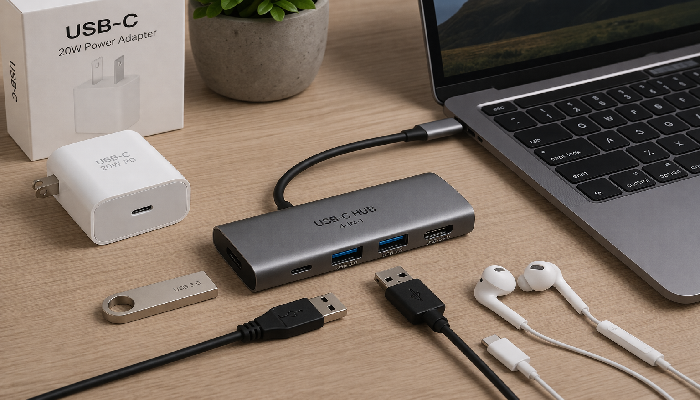
In today’s digital world, USB-C technology has become the universal standard for charging, data transfer, and device connectivity. Whether you own a smartphone, tablet, laptop, gaming console, or external storage device, chances are you use a USB-C cable regularly. Along with USB-C cables, USB-C OTG cables and Type-C to USB converters have become essential accessories for expanding device compatibility and functionality.
This guide explains everything you need to know about USB-C connectivity, including its benefits, uses, differences, and tips for choosing the right accessories.
What Is a USB-C Cable?
A USB-C cable is a modern connector designed to replace older USB standards such as USB-A, Micro USB, and Mini USB. It features a compact, reversible design that allows users to plug it in either way without worrying about orientation.
USB-C cables support:
- Fast charging
- High-speed data transfer
- Video output
- Audio transmission
- Device connectivity
Today, USB-C is widely used in smartphones, laptops, tablets, power banks, cameras, and gaming devices.
Key Features of USB-C Connectivity
1. Reversible Design
Unlike traditional USB connectors, USB-C plugs can be inserted in either direction, making them easier and more convenient to use.
2. Faster Charging
Many USB-C cables support Power Delivery (PD) technology, allowing devices to charge much faster than older USB standards.
3. High-Speed Data Transfer
Depending on the cable specification, USB-C can transfer data at speeds ranging from 480 Mbps to 40 Gbps.
4. Universal Compatibility
USB-C works with a wide variety of devices, reducing the need for multiple cable types.
5. Video and Audio Support
USB-C can transmit video signals to monitors, TVs, and projectors while also supporting audio output.
What Is a USB-C OTG Cable?
OTG stands for “On-The-Go.” A USB-C OTG cable allows your smartphone or tablet to act as a host device, enabling direct connections to USB accessories.
Instead of connecting through a computer, you can connect devices directly to your phone.
Common OTG-compatible devices include:
- USB flash drives
- Keyboards
- Mice
- Game controllers
- External hard drives
- Card readers
- Printers
A USB-C OTG cable typically has a USB-C connector on one end and a USB-A female port on the other.
How Does a USB-C OTG Cable Work?
Normally, smartphones act as peripheral devices when connected to a computer. OTG technology changes this behavior by allowing the smartphone to function as the host.
For example:
- Connect a USB-C OTG cable to your phone.
- Insert a USB flash drive into the OTG adapter.
- Your phone recognizes the flash drive as external storage.
- You can access, transfer, and manage files directly.
This functionality makes OTG cables extremely useful for productivity and data management.
Benefits of Using a USB-C OTG Cable
Easy File Transfers
Move photos, videos, and documents between devices without needing a computer.
Connect Peripherals
Use keyboards and mice with tablets and smartphones for a desktop-like experience.
Expand Storage
Access files stored on flash drives and external hard drives.
Gaming Convenience
Connect game controllers for improved gaming performance.
Improved Productivity
Work efficiently with external accessories while traveling.
What Is a Type-C to USB Converter?
A Type-C to USB converter is an adapter that allows USB-A devices to connect to USB-C ports.
These converters are useful when:
- Your laptop only has USB-C ports.
- You need to connect older USB accessories.
- You want to transfer data between different device generations.
The converter bridges compatibility gaps between modern and legacy devices.
Common Uses of Type-C to USB Converters
Connecting Flash Drives
Use existing USB flash drives with USB-C laptops and smartphones.
Using Legacy Accessories
Connect older keyboards, mice, webcams, and printers.
Data Transfer
Move files between devices that use different USB standards.
Charging Support
Some converters allow charging through compatible USB connections.
USB-C Cable vs USB-C OTG Cable
Many people assume these accessories are identical, but they serve different purposes.
| Feature | USB-C Cable | USB-C OTG Cable |
|---|---|---|
| Charging | Yes | Limited |
| Data Transfer | Yes | Yes |
| Connect USB Devices | No | Yes |
| Host Functionality | No | Yes |
| File Access from USB Drive | No | Yes |
A standard USB-C cable is mainly designed for charging and syncing devices, while an OTG cable enables direct communication with USB peripherals.
Types of USB-C Cables
USB 2.0 Type-C Cable
- Basic charging
- Moderate data speeds
- Affordable pricing
USB 3.0 Type-C Cable
- Faster file transfers
- Better performance
- Suitable for external storage
USB 3.2 Type-C Cable
- High-speed data transmission
- Supports professional workflows
Thunderbolt USB-C Cable
- Extremely fast speeds
- Supports multiple displays
- Ideal for creators and professionals
How to Choose the Right USB-C Cable
Check Charging Requirements
Ensure the cable supports your device’s charging wattage.
Verify Data Transfer Speeds
Choose cables with appropriate speed ratings based on your needs.
Look for Certification
Certified cables offer better safety and reliability.
Consider Cable Length
Longer cables provide flexibility but may affect performance if poorly made.
Build Quality Matters
Choose braided or reinforced cables for durability.
How to Choose the Best USB-C OTG Cable
Device Compatibility
Verify that your smartphone or tablet supports OTG functionality.
Connector Quality
High-quality connectors provide better reliability and lifespan.
Data Speed Support
Choose OTG cables capable of fast file transfers.
Durable Construction
Look for strong materials that resist wear and tear.
Advantages of USB-C Technology
Universal Standard
One cable can support multiple devices and functions.
Future-Proof Design
Most modern electronics now use USB-C.
Faster Performance
Improved charging and transfer speeds enhance productivity.
Reduced Cable Clutter
A single cable type simplifies device management.
Common Devices That Use USB-C
Smartphones
Most Android smartphones now use USB-C ports.
Tablets
Modern tablets rely on USB-C for charging and accessories.
Laptops
Many laptops feature USB-C as their primary connection standard.
Gaming Consoles
Portable gaming devices increasingly use USB-C technology.
External Storage
SSDs and hard drives often use USB-C for fast transfers.
Cameras
Professional cameras support USB-C for charging and data management.
Troubleshooting USB-C Connectivity Issues
Device Not Charging
- Check cable quality.
- Verify charger compatibility.
- Inspect ports for debris.
Slow Data Transfer
- Use higher-speed cables.
- Confirm USB version compatibility.
- Update device drivers if necessary.
OTG Device Not Detected
- Ensure OTG support is enabled.
- Try another OTG adapter.
- Test with a different USB accessory.
Intermittent Connections
- Replace damaged cables.
- Clean connectors.
- Avoid excessive cable bending.
Future of USB-C Connectivity
USB-C continues to evolve as the preferred connectivity standard across the technology industry. Governments, manufacturers, and consumers increasingly support USB-C due to its versatility and convenience.
Future improvements may include:
- Faster charging speeds
- Higher data transfer rates
- Enhanced power delivery
- Greater universal compatibility
As adoption grows, USB-C is expected to become even more dominant in consumer electronics.
Conclusion
USB-C cables, USB-C OTG cables, and Type-C to USB converters have transformed the way we connect and use modern devices. From fast charging and high-speed data transfer to connecting external accessories directly to smartphones and tablets, these accessories provide unmatched convenience and flexibility.
Whether you need a reliable charging cable, an OTG adapter for productivity, or a converter for compatibility with older devices, choosing high-quality USB-C accessories ensures better performance, durability, and future-proof connectivity.
Frequently Asked Questions (FAQs)
What is the difference between a USB-C cable and a USB-C OTG cable?
A USB-C cable is mainly used for charging and data transfer, while a USB-C OTG cable allows smartphones and tablets to connect directly to USB devices such as flash drives, keyboards, and mice.
Can all smartphones use USB-C OTG cables?
No. Your smartphone must support OTG functionality. Most modern Android devices support OTG, but it is best to verify with the manufacturer.
Are Type-C to USB converters safe?
Yes, high-quality converters from reputable manufacturers are generally safe and reliable.
Can USB-C support fast charging?
Yes. Many USB-C cables support fast charging technologies, including USB Power Delivery (PD).
What devices can I connect using a USB-C OTG cable?
You can connect flash drives, keyboards, mice, game controllers, external storage devices, card readers, and many other USB accessories.
Is USB-C faster than older USB standards?
Yes. USB-C supports significantly higher charging and data transfer speeds compared to Micro USB and many older USB connections.
Do all USB-C cables have the same speed?
No. Different USB-C cables support different specifications and speeds, ranging from USB 2.0 to Thunderbolt technology.
Why should I use a Type-C to USB converter?
A converter allows you to connect traditional USB devices to modern USB-C ports, improving compatibility and extending the usefulness of older accessories.